Interactive Questions
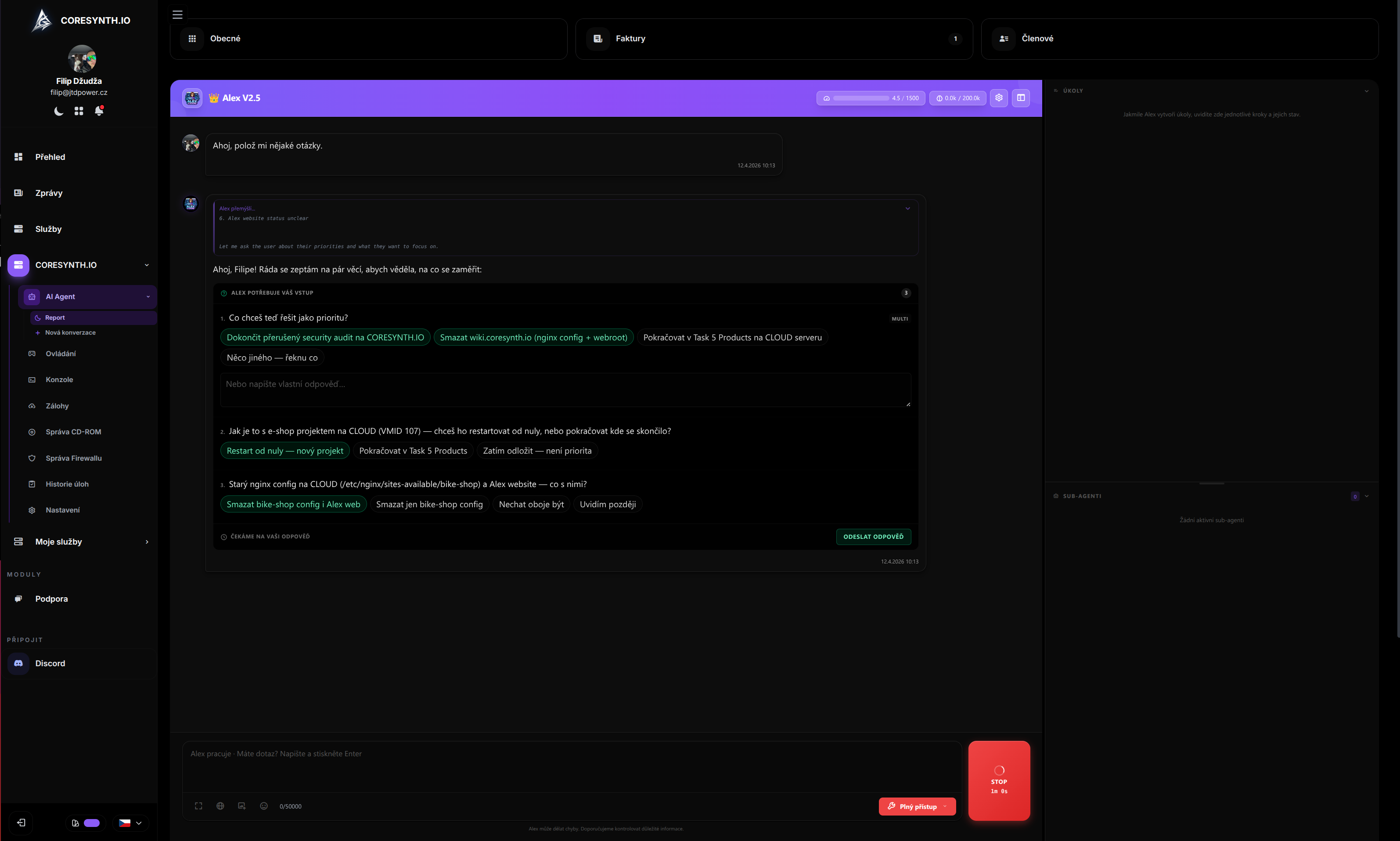
Alex V2 can pause and ask you for important decisions during its work. Instead of guessing what you want, it displays a clear card with options — and waits for your response.
How It Works
When Alex encounters a situation where it needs your decision (framework choice, confirming a destructive operation, clarifying requirements), it automatically displays an interactive card directly in the chat:
- Alex pauses its work and waits for your answer
- A card with questions and options appears in the chat
- You select an answer (or type your own)
- Alex continues with your decision
Question Types
| Type | Description | Example |
|---|---|---|
| Single choice | Select one option from the list | ”Which framework do you want?” — Laravel, Symfony, Nette |
| Multi-select | Select multiple options at once | ”Which plugins to install?” — Essentials, WorldEdit, LuckPerms |
| Free text | Type your own answer | ”What name do you want for the server?” |
| Combined | Select from options + custom text | Select “Other” and type your own value |
When Alex Asks
Alex asks in situations where it genuinely needs your decision:
- Ambiguous request — “Install a plugin” → Which plugin?
- Architectural decision — Which database? Which framework?
- Missing information — SSH port, software version, configuration
- Risky operations — Really delete the backup? Overwrite config?
- Prioritization — What to do first?
Alex does not ask for trivial situations where the answer is obvious from context.
Card Interface
The interactive card contains:
- Header — context about what you’re deciding
- 1 to 5 questions — answer each one separately
- Predefined options — just click to select
- Free text — type your own if no option fits
- Submit button — confirms all answers at once
Technical Details
| Parameter | Value |
|---|---|
| Max questions per card | 5 |
| Max options per question | 6 |
| Timeout | 10 minutes |
| Available in autopilot | No (manual mode only) |
| Available for sub-agents | No |
Page Reload Persistence (F5)
If you refresh the page while Alex is waiting for your answer, the card is restored automatically. Alex remembers unanswered questions via markers in the message history.
Cross-tab Synchronization
If you have the chat open in multiple tabs, answering in one tab is reflected in all others.
Usage Examples
Framework Selection
Alex asks: “Which PHP framework do you want for the new project?”
- Laravel
- Symfony
- Nette
- CodeIgniter
- Other (type your own)
Destructive Operation Confirmation
Alex asks: “Are you sure you want to delete the old backup from April 14?”
- Yes, delete it
- No, keep it
Task Prioritization
Alex asks: “You have 3 issues on the server. Which one should we fix first?”
- Fix 502 error on the website
- Update Java to version 21
- Install new plugins
Next Steps
- Alex AI — Introduction to Alex
- Superpowers — Skills and workflows
- FAQ — Frequently asked questions
Need help? Open a support ticket or ask Alex in your panel.